Filing Questions

library_booksFiling Questions

FAQ / Quick questions

Absolutely! If you don't see it as an option on your account, you'll have to deactivate your return and start over. 

To deactivate a return:

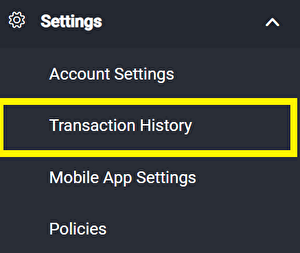
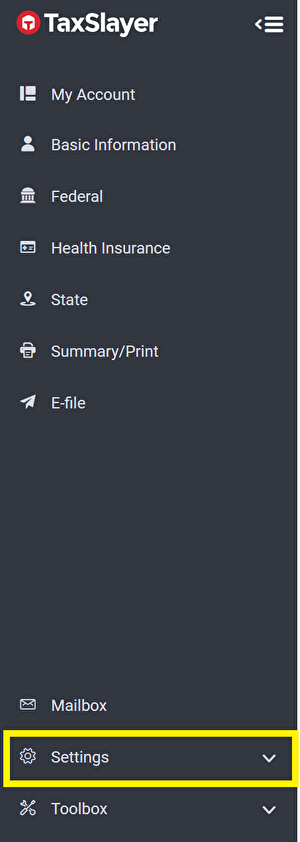
1. Click the "Settings" button on the left hand toolbar.

deactivate return

2. Click "Transaction History".

deactivate return

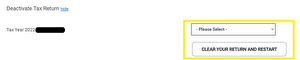
3. Scroll down to "Deactivate your return", select a reason for deactivation and click "clear your return and start over". 
deactivate return

You'll be logged out and able to start over again.

4. Log back into your TaxSlayer account and enter your basic information

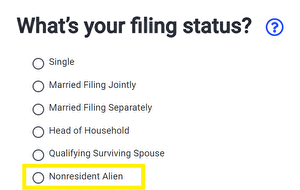
5. When you get to the Filing status page, click "Nonresident Alien", followed by your appropriate filing status.
1040nr

Unfortunately, MyFreeTaxes cannot assist with questions on Form 8863, as the certification and training our Helpline receives does not include interpretation of tax treaties. You may consider consulting a commercial tax preparer to ensure your interpretation is correctly applied and then continue following their advice if you want to self-file in the future.

The IRS provides detailed instructions to help individuals prepare and file a 1040 Schedule C return. Visit  https://www.irs.gov/instructions/i1040sc for help.  

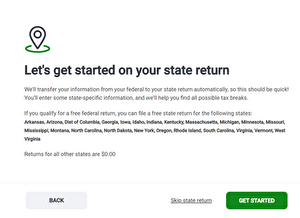
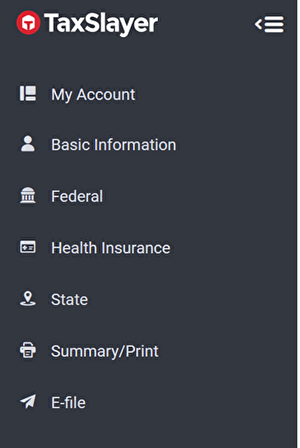
To file a state return (or multiple), please click on the 'State' tab on the left-hand toolbar within your TaxSlayer account.

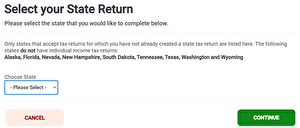
From there, you'll be able to choose your state and begin your return. Once that state is complete, you'll be given the option to add another State return.  

state 1
state 2
state 3

You can’t use TaxSlayer to e-file a state return if you didn’t use the software to e-file your federal return. But, you can use TaxSlayer to create a state-only return that can be submitted by mail. 

 Keep in mind that much of the information on a state return is pulled from your federal return. Because of this, you must enter your federal return information as though you are preparing a federal return. Once you’ve done this, follow these steps:  

  1. State
  2. Add State Return
  3. Choose State from the drop-down menu
  4. Continue
  5. Select resident return type
  6. Continue. Make any necessary adjustments to your state return and click Exit Return to save changes. 

 Once you've completed both your federal and state returns, you will be asked how you want to file your returns. Select "print and mail" to print and mail your state return.  To print: 

  1. Summary/Print
  2. Select "View Return" to view, print or save a PDF copy of your return. If you do not see an option for "View Return", select the "Show Details" dropdown. 


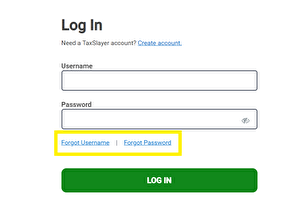
MyFreeTaxes does not have the ability to log into your account or to access your account information. Use the 'forgot password' or 'forgot username' feature on the login page to reset your account information.

Can't Access Account

Yes! You can file a return using our free software without reporting any income. If no have no income this will enable you to claim certain refundable tax credits, like the Earned Income Credit and/or the Child Tax Credit. The IRS recommends entering $1 in the “Other Income” section of your Federal return with “IN ORDER TO E-FILE" listed in the description field. 

Follow these steps: 

  1. Click “Income” under the Federal section.
  2. Scroll down and click Begin next to “Less Common Income”.
  3. Click Begin next to “Other Income Not Reported Elsewhere”.
  4. Select Other Income from the drop-down menu.
  5. Enter $1 for the value and list "IN ORDER TO E-FILE" in the description.

In most cases you can use MyFreeTaxes to file as a nonresident alien.

  • Choose "File My Own Taxes" on the MyFreeTaxes homepage and create or login to your TaxSlayer account.
  • On the "What's your filing status?" page, you will need to select "Nonresident Alien" in order to access the correct forms. If you miss this step, you'll need to delete your return and start over, then select "Nonresident Alien" as your status.
  • If you are using the MyFreeTaxes Have My Taxes Prepared for Me option, many of the free tax sites we connect you to are able to file form 1040-NR for nonresident aliens. When you choose a site and contact them to make an appointment, be sure to confirm their site has the Foreign Student certification from the IRS and can file returns for nonresident aliens.

Please contact the Helpline if you have any questions.

This is a security feature used by TaxSlayer. Your direct deposit information was transferred with both your Federal and State returns if that is what you selected. When you print or download your own copy of your return from the filing software you will see your direct deposit information is either blank or listed as all Xs.

Yes, you can use MyFreeTaxes to claim the tax credits and deductions you deserve. You can file a return to claim the Child Tax Credit even if you did not have any income.

If you have no income but want to e-file your return, the IRS recommends entering $1 in the “Other Income” section of your Federal return with “IN ORDER TO E-FILE" listed in the description field. 

Follow these steps: 

  • Click “Income” under the Federal section.
  • Scroll down and click Begin next to “Less Common Income”.
  • Click Begin next to “Other Income Not Reported Elsewhere”.
  • Select Other Income from the drop-down menu.
  • Enter $1 for the value and list "IN ORDER TO E-FILE" in the description.

This is a TaxSlayer security feature. If you elected to receive your Federal and State refunds via direct deposit, your banking information was transferred with your returns. But, to protect your banking information, TaxSlayer does not print your bank account number on your return. The field is blank or includes a series of Xs.

If you are having trouble entering your prior year AGI follow these steps within your TaxSlayer account: 

  1. Click on E-file on the gray navigation bar on the left side of the screen.
  2. Check yes and click continue
  3. In step 4, “Sign and File,” there is a question that reads: “Did you electronically file (e-file) your return last year?”
  4. In order to enter your prior year AGI you will need to select the top option, which reads “Yes, I e-filed my 2024 return and have access to it.” Click continue.
  5. Select the type of return you filed last year. For most users it will be 1040. Click continue.
  6. Then enter your prior year AGI and click Continue. 

There are a number of reasons that your tax refund could be delayed. First, check to make sure that you received an email confirmation that your return was accepted by both the federal and state government. Second, check to make sure that all of your tax documents were included with your return. Missing documents are a common reason for refund delays.

If your tax return included an Individual Taxpayer Identification Number (ITIN) application/ renewal, or if you recently received a new SSN for yourself or anyone else on your return, this could also delay your refund. If the IRS needs additional verification or if your return gets audited, they may request additional authentication before releasing your tax refund.

The IRS recommends a few options for obtaining your prior-year AGI.


Preferred Method
You should always retain a copy of your tax return.

On your prior-year tax return, your AGI is on line 8b of the Form 1040.

  • If you are using the same tax preparation software that you used last year, that software will likely have your prior-year tax return.
  • If you’re not using the same tax preparation software as last year, you may be able to access your prior-year software and view an electronic copy of your prior-year return.
  • If you are a first-time filer over the age of 16 enter zero as your AGI.
  • If you have an Identity Protection (IP) PIN, you should enter it when prompted by your software. It will serve to verify your identity, instead of your prior-year AGI or prior-year Self Select PIN. You can opt into the IP PIN program through the IRS’ online tool.

Alternative Methods

  • If you do not have a copy of your tax return, you may use a Get Transcript self-help tool to get a Tax Return Transcript showing your AGI.
  • Use the IRS’ Get Transcript Online tool to immediately view your AGI. You must pass the Secure Access identity verification process. Select the Tax Return Transcript and use only the “Adjusted Gross Income” line entry.
  • Use Get Transcript by Mail or call 800-908-9946 if you cannot pass Secure Access and need to request a Tax Return Transcript. Please allow 5 to 10 days for delivery. Use only the “Adjusted Gross Income” line entry.

If you suspect someone stole your identity and used your social security number (SSN) to file a tax return: Click here to go to the IRS site to learn more about the steps you can take to protect yourself.

If you need your prior year Adjusted Gross Income (AGI) to e-file and you don’t have access to last year’s return, click here to visit the IRS' Get Transcript tool. 

Federal Refund Status: If you need to check the status of your refund, you can use the IRS' online tool: "Where's My Refund?". You can also check the status of your federal refund by phone by calling the IRS Refund Hotline at 1-800-829-1954. 

State Refund Status: Most states provide online status inquiry. Some states have automated phone verification for refund status, those telephone numbers are provided on the website.

Alabama

Arizona

Arkansas

California

Colorado

Connecticut

Delaware

DC

Georgia

Hawaii

Idaho

Illinois

Indiana

Iowa

Kansas

Kentucky

Louisiana

Maine

Maryland

Massachusetts

Michigan

Minnesota

Mississippi

Missouri

Montana

Nebraska

New Jersey

New Mexico

New York

North Carolina

North Dakota

Ohio

Oklahoma

Oregon

Pennsylvania

Rhode Island

South Carolina

Utah

Vermont

Virginia

West Virginia

Wisconsin   

The MyFreeTaxes software (accessible by selecting the “File My Own Taxes” option on our homepage) allows filing and amending current year returns.

  • To amend your return, select E-file in the main navigation menu. Then, select the Amended Return menu item that appears in the navigation menu.
  • Once you have completed your amended return, select Continue at the bottom of the Amended Return menu to choose how you wish to file it. If you choose to e-file, complete the process to file your Amended Return the same way as your Federal Return.

If you need help amending your tax return, select "Have My Return Prepared For Me" on the MyFreeTaxes home page to find a VITA site near you. VITA programs can file and amend returns for the last three years. 

The email notifying you of the rejection should provide a rejection code that clearly states the reason for the rejection. Make corrections by logging back into your TaxSlayer account through MyFreeTaxes and refile. If that doesn't work, you may have to file a paper return or contact the IRS. The most common reasons for rejection are:

1. Employer EIN does not match IRS information
2. Social Security number does not match IRS name
3. Someone already filed using a dependent's Social Security number
4. IRS identity theft PIN is wrong or was omitted

Yes! You can file an extension through MyFreeTaxes and finish filing by October 15, 2026. If you owe taxes and do not pay by the April filing deadline, the IRS will charge you interest each month on the amount you owe until you file and pay. You can learn more here about filing an extension here.

The Earned Income Tax Credit (EITC) is a refundable credit for hard working individuals and families. Eligibility is based on your earned (W-2) income. The amount you qualify for usually increases as you add qualified dependents. Additional qualifications include:

  • Taxpayers and qualifying dependents must have Social Security Numbers that allow them to work in the U.S.
  • Cannot file as Married Filing Separately
  • Must be a U.S. citizen or resident alien all year
  • Cannot have foreign income
  • Have investment income of $11,950 or less
  • Cannot be claimed as a dependent by someone else
  • Dependent(s) must be related to you, meet certain age requirements, must reside with you for more than half the year, and cannot be claimed by more than one person

For additional information on the EITC: https://www.irs.gov/credits-deductions/individuals/earned-income-tax-credit/use-the-eitc-assistant

Yes, you can, though it may make more financial sense to file jointly. Filing jointly may also help you qualify for many tax credits and deductions, including the EITC (Earned Income Tax Credit).

If you elect to file separately, keep in mind that If one spouse itemizes their deductions, the other spouse must do so as well. If neither spouse itemizes, both can take the standard deduction.

The IRS recommends a few options for obtaining your prior-year Earned Income.

Preferred Method
Retrieve a copy of your prior-year tax return.

  • Look for Form 8812. Earned income is shown on line 6a.
  • If there is no Form 8812, look for the EITC worksheets, which are usually included at the end of your return. Earned income is listed on Worksheet A, Line 1 and Worksheet B, Line 4b.

Alternative Methods
If you do not have a copy of your prior-year return, you can obtain a transcript from the IRS.

  • Use the IRS’ Get Transcript Online tool to immediately view your earned income for a certain tax year. You must pass the Secure Access identity verification process. Select the Tax Return Transcript and use only the “Schedule EIC Earned Income Per Computer” line entry.
  • Use Get Transcript by Mail or call 800-908-9946 if you cannot pass Secure Access and need to request a Tax Return Transcript. Please allow 5 to 10 days for delivery. Use only the “Schedule EIC Earned Income Per Computer” line entry.

Helpline

The MyFreeTaxes Helpline is staffed by dedicated call specialists who have completed IRS VITA program training and certification. Our Helpline call specialists are available to answer questions about MyFreeTaxes, help you troubleshoot issues you may face while using the tax filing software we connect you to, and answer certain tax questions you have while completing your return through MyFreeTaxes.

Our main Helpline can be reached at 866-698-9435. It is available 10 am - 8 pm ET daily from February 6 - April 18, and Monday through Friday from 10 am - 6 pm ET from April 21 - October 31.

Send us a message

Use the form below to send our support team a message. We'll do our best to get back to you within one business day. If you need support immediately, you may call our Helpline to speak with a support specialist. Please note, you must have cookies enabled for your browser to complete the CAPTCHA anti-spam check and click the submit button.